Troubleshoot #69
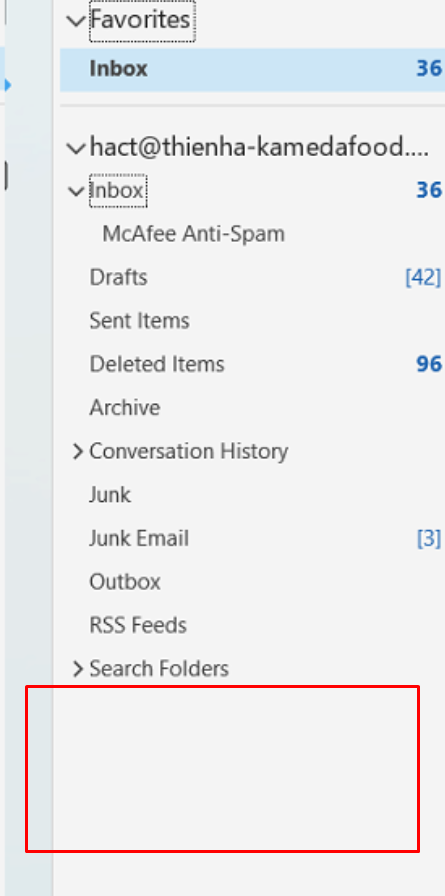
closedEmail: [email protected] does not display the Group folder on Outlook
100%
Description
- Requester: hact@[email protected]
- Proposed support department: Hanoi.
- Request:
+ Step 1: Call user hact to discuss the problem you are having.
- User hact is having a problem with the Group folder on Outlook not being displayed.
+ Step 2: GMO Technical inspection using Teamview.
+ Step 3: GMO Technique checks that the user hact is an administrator in many Groups such as: Hanoi, Marketing,... but on Outlook the Group folder is not displayed.
- However, the remaining members still display the Group folder normally on Outlook.
+ Step 4: GMO Technique is contacting Microsoft 365 Technique to assist with this issue.
- Still waiting for their response.
+ Step 5: GMO Technician talked to user hact@[email protected] asking for permission to postpone to re-check.
- When there are response from the Microsoft 365 technical side, the GMO technical side will proactively contact hact@[email protected] to resolve the issue.
+ Step 6: The customer agrees and disconnects Teamview.
- Result: As soon as there is a response from Microsoft 365 technicians, the customer will be contacted (The problem has not been resolved)
Files
Updated by Tn Minh almost 3 years ago
Update:
- Requester: hact@[email protected]
- Proposed support department: Hanoi.
- Request content from Customer: The account [email protected] on Outlook is not displaying the Group folder
- Reciprocal GMOs:
+ Step 1: Call user hact to discuss the problem you are having.
- User hact is having a problem with the Group folder on Outlook not being displayed.
+ Step 2: GMO Technical inspection using Teamview.
+ Step 3: GMO Technique checks that the user hact is an administrator in many Groups such as: Hanoi, Marketing,... but on Outlook the Group folder is not displayed.
- However, the remaining members still display the Group folder normally on Outlook.
+ Step 4: GMO Technique is contacting Microsoft 365 Technique to assist with this issue.
- Still waiting for their response.
+ Step 5: GMO Technician talked to user hact@[email protected] asking for permission to postpone to re-check.
- When there are response from the Microsoft 365 technical side, the GMO technical side will proactively contact hact@[email protected] to resolve the issue.
+ Step 6: The customer agrees and disconnects Teamview.
- Result: As soon as there is a response from Microsoft 365 technicians, the customer will be contacted (The problem has not been resolved)
Updated by Tn Minh over 2 years ago
- Status changed from In Progress to Closed
- % Done changed from 40 to 100